Keep your Shopify product image names consistent as your catalog grows.
No spreadsheets. No scripts. No maintenance.
7-day free trial
“Really good app. Saved me 10h of work, no joke!”
The Image Naming Problem
New Products Keep Breaking Your Naming Convention
Every time you add new products, images come in without a consistent naming standard. Without a reliable process, your naming convention breaks down over time.
Spreadsheet Tools Don't Scale
Exporting to CSV, editing manually, re-importing - it's slow and error-prone. And it needs to be repeated with every new product addition, making it harder to stay consistent.
Missing Out on SEO Opportunities
Search engines and AI tools use filenames and alt text to rank and surface your products. Renaim creates descriptive image names and alt text from your product data to improve visibility.
Powerful Features for a Consistent Catalog
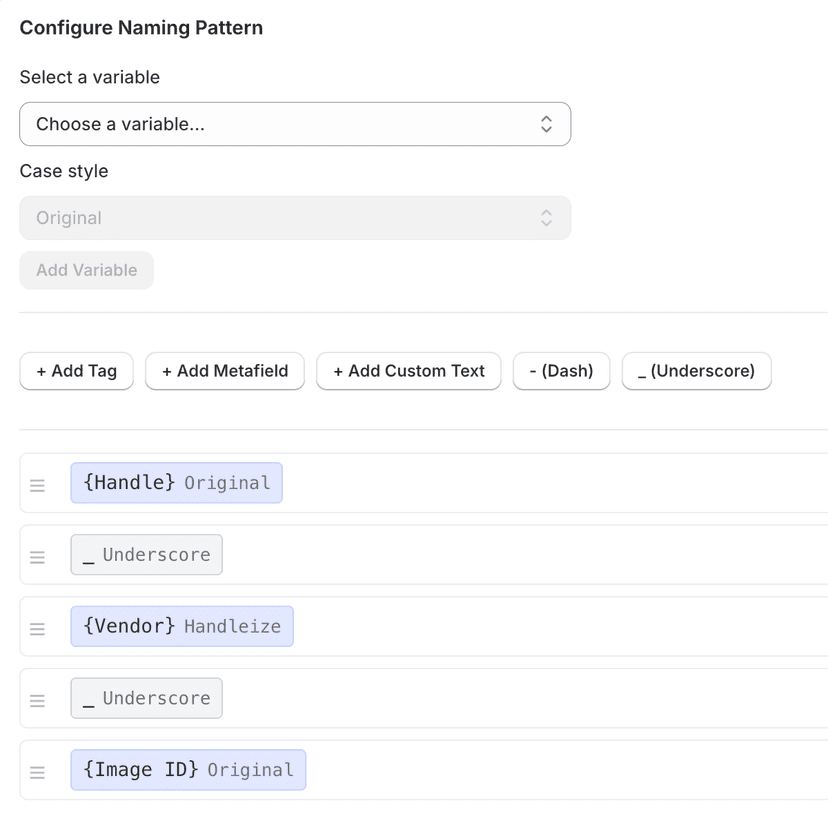
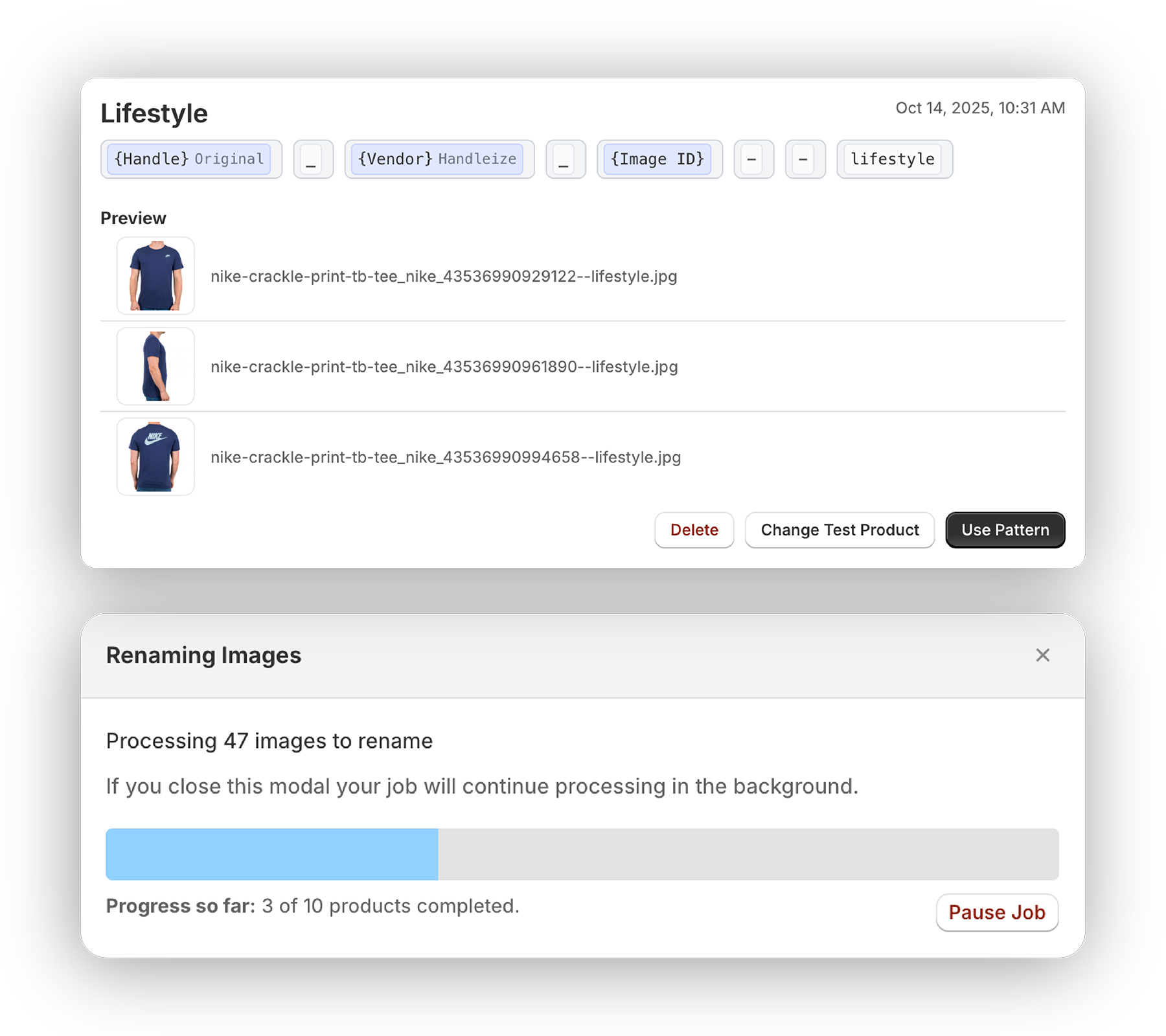
Saved Naming Patterns
Build patterns from product, variant, and image attributes including title, SKU, option values, and more. Save them and reuse them whenever you add new products.
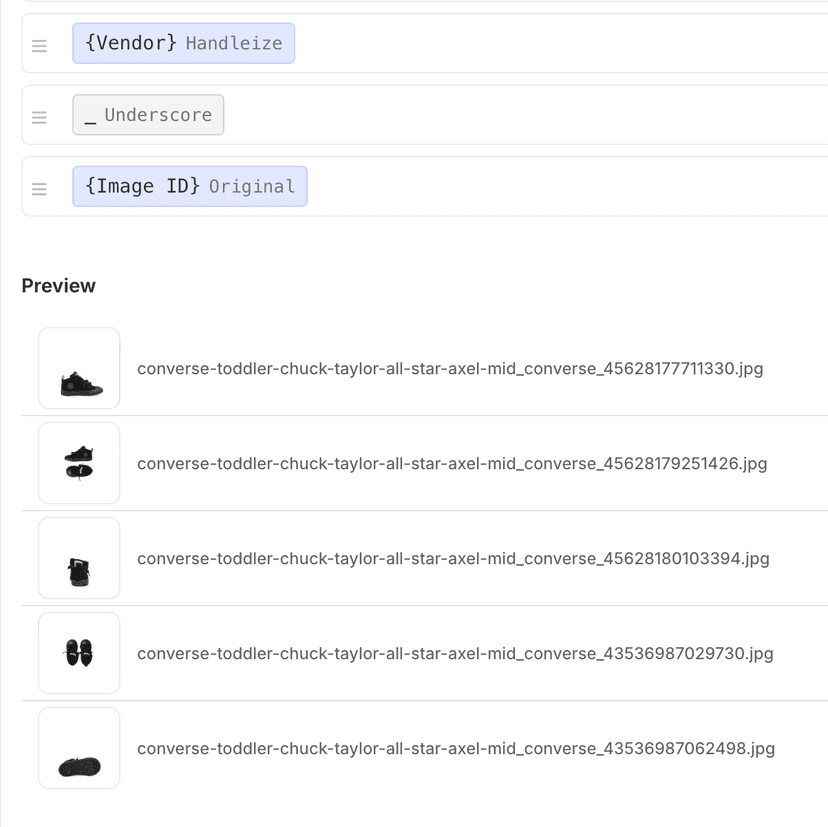
Live Preview
See exactly how your images will be renamed before applying changes. Test with different products.
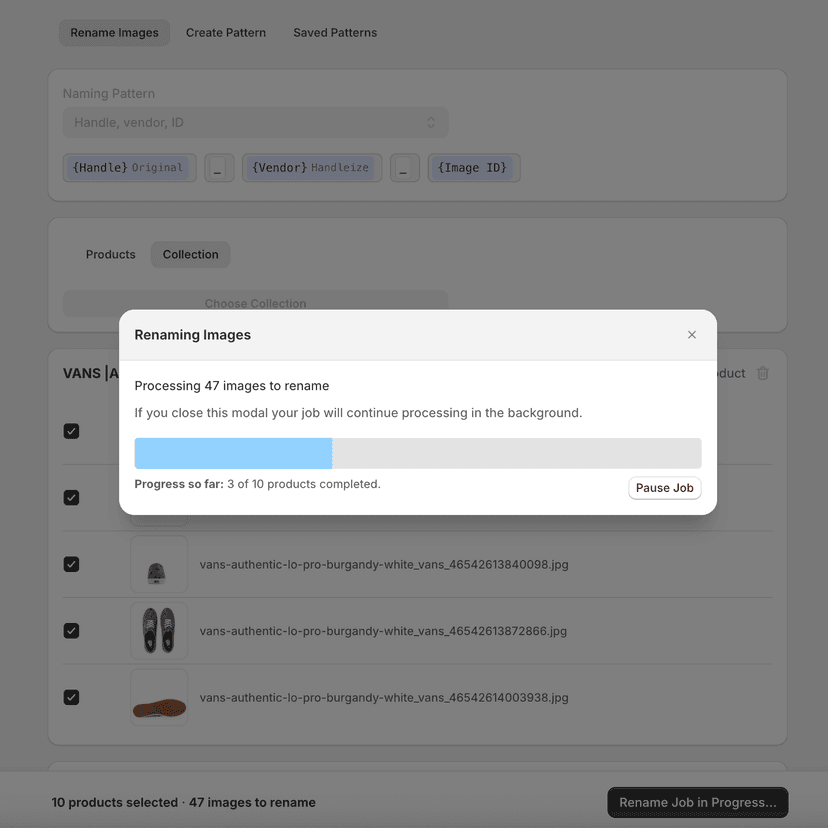
Bulk Operations
Apply your naming pattern across your entire catalog, and come back to do it again whenever new products arrive.
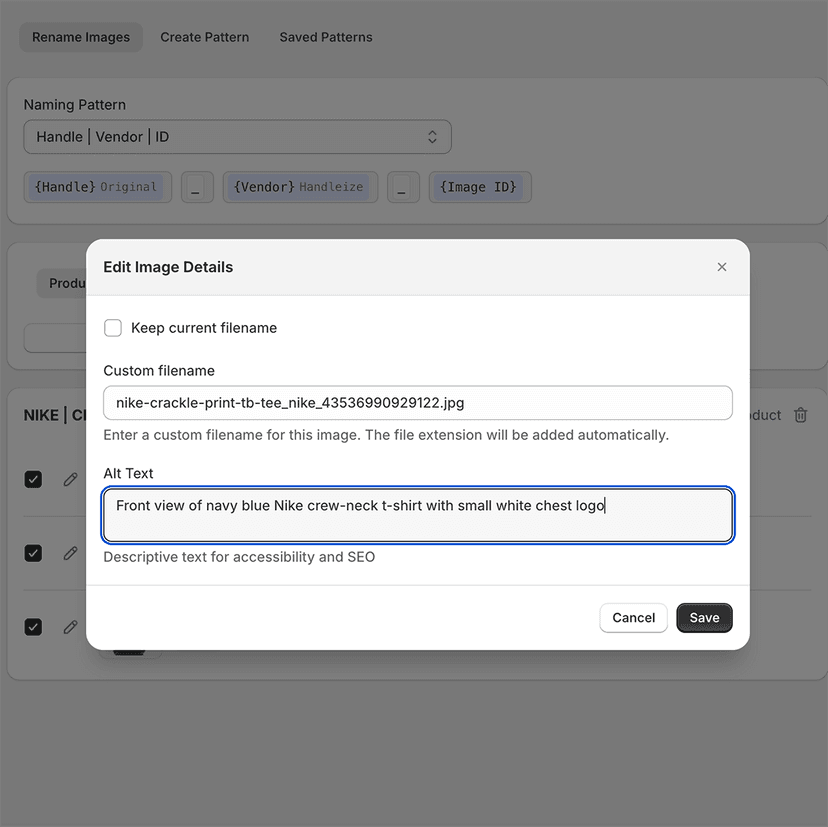
Alt Text Editing
Edit image alt text alongside renaming or as a standalone process. Boost accessibility, SEO, and AI search discovery.
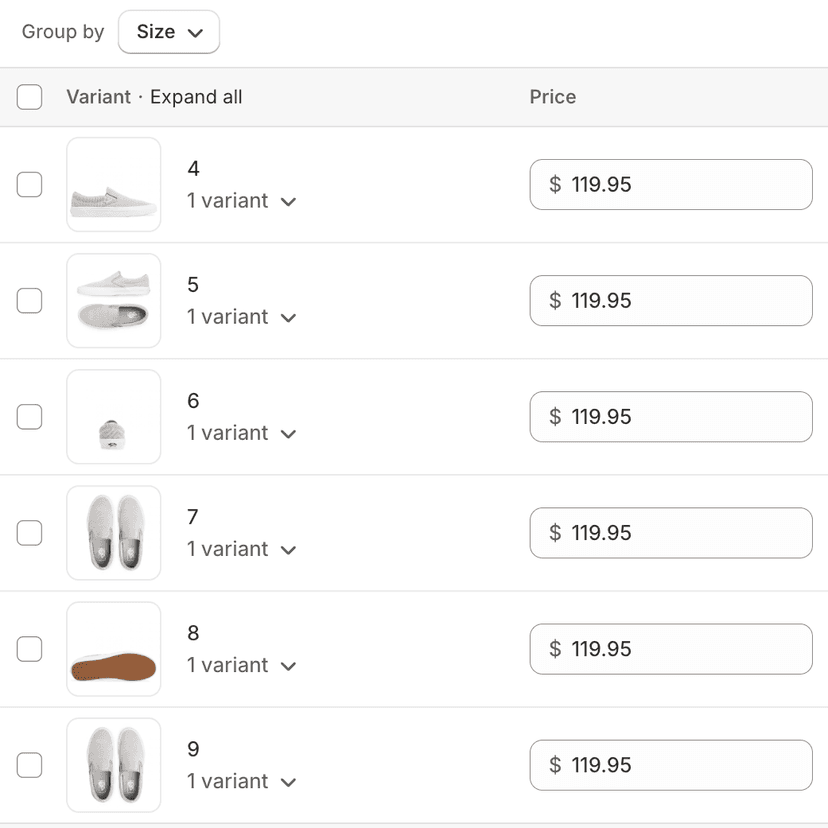
Preserves Product Associations
Variant images and any merchandising references stay intact when renaming images.
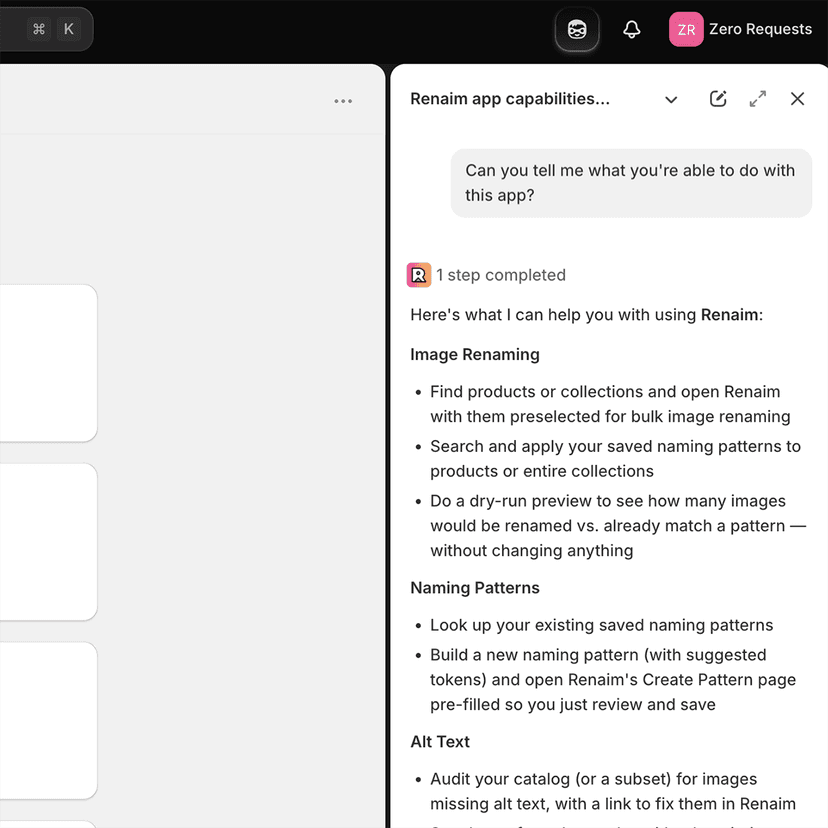
Works with Shopify Sidekick
Ask Shopify Sidekick to rename images, fix alt text, or build a pattern - Renaim opens preconfigured for you to review and confirm.
How It Works
Build Your Pattern
Build patterns from product, variant, and image attributes, and custom text.
Preview & Apply
Review how images will be renamed, then apply changes to all selected products at once.
Reuse Patterns
Save and reuse your naming patterns for consistent image naming across your catalog.
Just ask, and Renaim does the rest.
Talk to Shopify Sidekick in plain language and it works with Renaim to find your products, apply your patterns, and audit alt text - then opens Renaim preconfigured so you can review and confirm. Nothing changes until you say so.
- “Rename all images in my Vans collection”
- “Rename images for products added this month”
- “Which products are missing alt text?”
- “Create an SEO-friendly naming pattern”
- “Did my last rename have any errors?”
Image renaming
- Find products or whole collections and open Renaim with them preselected
- Scope by vendor, product type, tag, or date (like “products added this month”)
- Search and apply any of your saved naming patterns
- Dry-run a pattern to see what would change - without touching a thing
Naming patterns
- Look up your existing saved patterns
- Get a new pattern suggested and opened in Create Pattern, pre-filled to review and save
Alt text
- Audit your catalog for missing alt text, then fix it all from your product titles in one step
- Set alt text from the product title, description, or a metafield
- Fix alt text on its own, without renaming any files
Job tracking
- Check the status and progress of a running rename job
- See how a finished job went - renamed, skipped, or errored
Help & summaries
- Ask how-to questions about using Renaim
- Get an at-a-glance summary of your Renaim usage
You stay in control
- Read-only and navigate-only by design
- Sidekick never renames on its own - you always get the final click
- Turn the integration on or off, and set a default pattern, anytime in settings
Simple, Transparent Pricing
What's Included:
- Save unlimited naming patterns
- Reuse patterns every time new products are added
- Alt text editing
- Live preview
- Preserves product associations
- Works directly in Shopify admin
- Works with Shopify Sidekick
- Unlimited image renaming
Pro
Billed $60/year
Everything you need to keep your Shopify product images consistently named.
7-day free trial
Available in Multiple Languages
Use Renaim in your preferred language
(Brazil)
Frequently Asked Questions
No, image renaming changes the actual filenames in Shopify and these changes are not tracked. We include a download button to help you backup images before renaming, making it easy to restore if needed.
Yes, the filename changes will immediately reflect on your live store. If your theme contains functionality that references current filenames or naming conventions, you should take this into consideration before renaming images.
Yes, Renaim uses Shopify's fileUpdate mutation which preserves all product associations including variant images, collection associations, and metafield references.
Theme settings that reference products will continue working, however, theme settings that reference individual images by filename (not through a product) may break. You can restore these by uploading your backup images to Shopify's Files section.
Yes! We offer a 7-day free trial with full access to all features. Simply install from the Shopify App Store to get started.
There's no limit on how many you can select. Renaim renames up to 1,000 images each time you run it and automatically keeps the rest queued — just run it again to continue with the next batch. Tip: turn on "Hide images that already match the pattern" so renamed images drop off the list and it's easy to see what's left. Your saved patterns are ready whenever you come back.
Yes. Ask Shopify Sidekick in plain language - for example, "rename my backpack images" or "which products are missing alt text?" - and Renaim opens with the right products, your naming pattern, and any alt text already set up, ready for you to review.
No. The Sidekick integration is read-only and navigate-only: it finds products and prepares the change, but it never renames anything on its own. You always get the final review and confirmation inside Renaim.
Yes. In Renaim's settings you can enable or disable the Sidekick integration at any time, and set a default naming pattern that Sidekick uses when you don't specify one.
Yes, we are happy to provide email support to help you get the most out of Renaim. Please email us at renaim@sizzlecentral.com if you have any issues, and we'll get back to you as soon as possible.
Have another question? Get in touch!
Ready to Keep Your Product Images Consistently Named?
Join merchants who rely on Renaim to maintain a consistent image naming standard.
Install Renaim